Level of detail - Streaming
Last changed on
This post is the segue to the first post about LOD, and tries to present how Ad lumens applies LOD in the context of streaming data over websockets.
Server- and client-side level of detail areas
The drawing below is a flattened 2D illustration of the 3D navigator "LOD bubbles":
- In black, at the center, is the position of the observer
- The darker blue disc is the area where passive LOD is maximal
- The lighter blue disc is the area where passive LOD is minimal.
Each 2D grid element represents a cube. For more about cubes, please see this post. The "center cube" is the one containing the observer's current position - it does not matter where in the cube as long as it is inside.
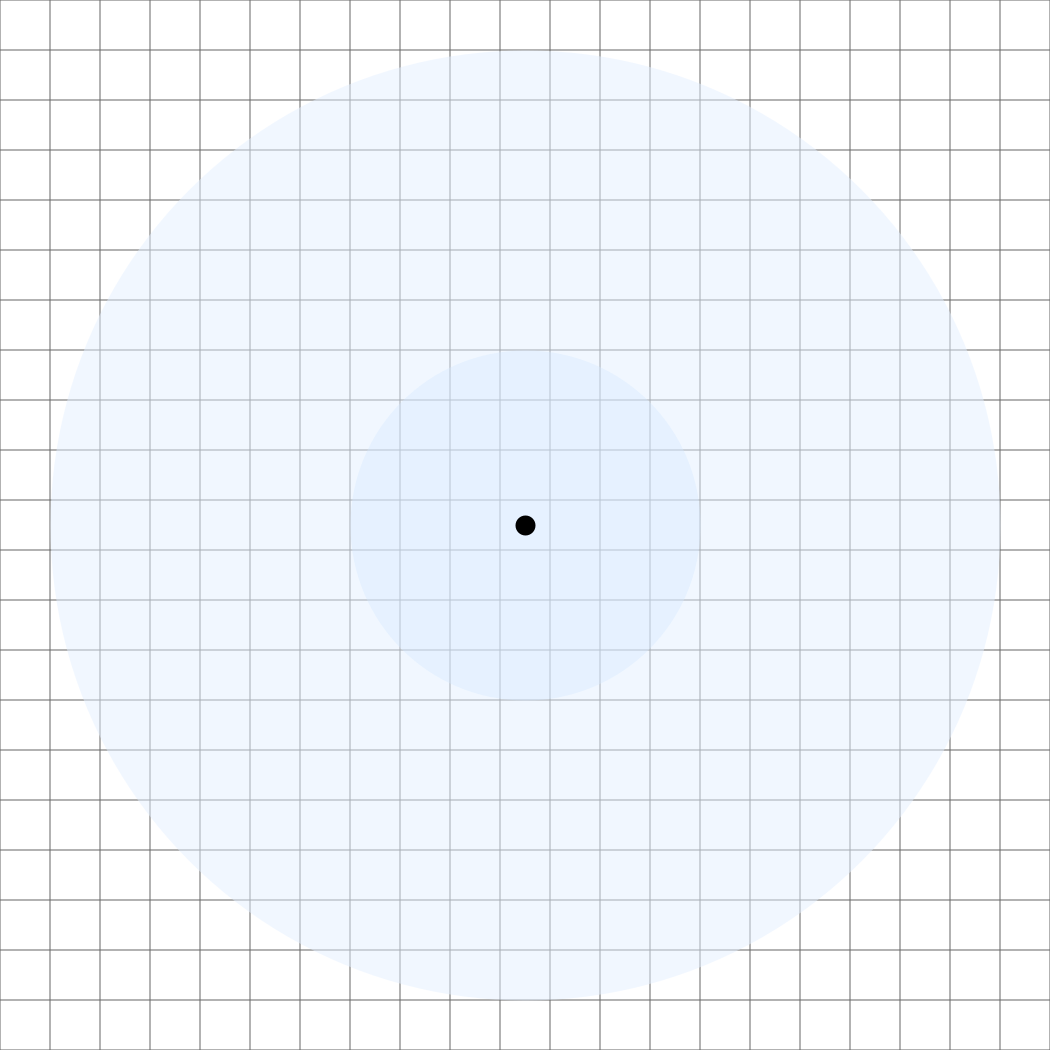
The X and Y distances can be chosen depending on hardware, both client- and server-side:
| Distance (in cubes) | Passive LOD | Explanation |
|---|---|---|
| From 0 to X | Maximal: LOD_STAR | Details about: systems, stars |
| From X to Y | Minimal: LOD_SYSTEM | Details about systems only |
The above table is applicable for passive LOD, so for visual immersion. This means that these "LOD bubbles" follow the observer wherever it goes:
- Nearby cubes visually indicate the color of stars
- Faraway cubes only visually indicate the presence of stars
- At all times, many many cube surround the observer; only a relatively small fraction contains actual star visual information, as summed up in the table below.
| Passive LOD range | Cubes with star data | Cubes with system data only | Total number of cubes | Generation time |
|---|---|---|---|---|
| 4 | 7 | 250 | 257 | ~2ms |
| 8 | 33 | 2076 | 2109 | ~8ms |
| 12 | 123 | 7030 | 7153 | ~25ms |
| 16 | 257 | 16820 | 17077 | ~55ms |
In summary: the more data, the more CPU time, the more bandwidth to push over websockets, the more CPU/GPU time on the client!
Generation times measured on an Intel(R) Xeon(R) D-2141I CPU @ 2.20GHz (hardly a super high-end CPU) and with rust's rayon crate.
Movement and level of detail
When the observer moves in the virtual world, either via smooth camera displacement (like in the upcoming 3d explorer) or abrupt loading such as on initial load or sudden unit focus, the point of view moves as well.
Again, this means the LOD bubbles move alongside the observer. But there is a problem: should we reload eveything around the new POV each time it changes? Even though it is perfectly doable and should be reasonably fast, maybe a cleverer strategy can be played to avoid:
- Unneeded server-side computations
- Useless bandwidth usage (not from a price perspective, but simply: we want to send only what's necessary to the client)
- Potentially some client-side jitters and flashing in and out of stars or other objects (let's call that the FUC. Harr harr harr).
Let's imagine a scenario where an observer starts at position A, then moves to position B, then to position C. The LOD bubbles around it, respectively blue, teal and green, move as well to follow it.

The first thing we see on this image is overlapping areas, especially between A and B, and B and C. And where there is overlap, there is repetition we should try and get rid of. It represents redundant computation, redundant data sent over the wire, and redundant data handled by the client.
These are the server- and client-side steps to achieve this:
- When a position change implies movement into a different cube, the server computes the coordinates of the cubes inside the LOD bubbles around that new cube. Note that an initial load is considered as an arrival in a new cube - the cube position changes from nothing to something.
- The server compares the previous list of cube coordinates and the new one, and determines the delta between the two, on a LOD basis: one delta for
LOD_SYSTEMand another forLOD_STAR. - The server then knows what the client should get rid of, what it should change and what it should add.
- That "reversed"delta is sent to the client in a appropriate way:
- list of cubes to completely remove
- list of cubes downgraded from
LOD_STARtoLOD_SYSTEM - list of cubes upgraded from
LOD_SYSTEMtoLOD_STAR, along with the relevant data - list of new
LOD_STARcubes - list of new
LOD_SYSTEMcubes
- The client receives that data and updates meshes, particles systems, etc, accordingly.
If these circles look like Venn diagrams, it's because they are just that. Computing the difference, union, and intersection values over times involve set operations, facilitated by rust's FxHashSet.
Intra-cube movement
The previous sections are about movement between cubes. But what happens when the observer gets close enough to a star?
Star proximity threshold
When the observer is known, server-side, to be close enough to a star - say at a maximum of 1 light year, it sends some extra information: the information about planets, satellites, etc. The raw data of it is similar to what can be found in the data explorer, of course formatted in a way that's appropriate for 3D rendering.
This results in orbits, planets and all to be displayed, which correspond to the LOD_SATELLITE level of detail.
when the same observer moves far away away from the star, the server notifies the client to remove all data and assets related to planets and other smaller entities.
Planet proximity threshold
Is to a planet what the star proximity threshold is to a star. The exact same logic applies and in this case, the LOD_SUBSATELLITE level of detail is applied.
Please signin to add your comment.